xum1541 beta now available

I’m proud to announce that the beta release of the xum1541 USB floppy adapter is now available. The firmware and host-side code are now available in OpenCBM cvs. See my xum1541 home page for information about building and setting up the first hardware, based on the Atmel AT90USBKEY development board.

This beta is pretty well-tested on Windows and Mac OS X, including error handling cases. However, both the device and host-side code is likely to change between now and the final release, so be sure you’re willing to upgrade if you want to start using it now. Notably, the nibbler support is still being debugged, so it isn’t enabled yet.

I’d like to thank Wolfgang Moser, Spiro Trikaliotis, and Christian Vogelgsang for testing various code drops, building their own devices, and providing good advice as things progressed.

Getting kids started in science and electronics

I’m happy that there’s been a recent resurgence of the build-it-yourself mentality in the tech crowd. For a while, there was a dearth of interest in how electronics and low-level software work. If you were lucky enough to have engineers as parents, you may have grown up with electronic kits and mathematics. But if grew up in a small town like I did, you may have learned from an amateur radio operator.

Radio was the most popular tech hobby before personal computers became common in the early 1980’s. In the 1950’s, my parents’ generation built crystal radios or worked with awesome explosive and radioactive chemistry kits. In the 1960’s, kids built transistor radios or simple relay-based logic to play tic-tac-toe. I have great memories of visiting my relatives and finding these projects from their childhood in the closet. With the advent of multi-frequency scanners and cheaper radios in the 1970’s, amateur radio became even more popular than it ever had been. CB radio was even mainstream.

There were several HAMs that were friends of our family. Hal was a dispatcher for an air-conditioning repair service. He had a spare bedroom that was full of equipment. It was pretty magical to hear the morse code beeping out a message from a repeater on some distant mountain. In the evening, the teletype would constantly bang out words from HAMs all over the region, sending callsigns and weather reports to each other. It was the predecessor to IRC, IM, and texting.

Amateur radio and computers fit very well together. Hal gave my dad our first computer, a VIC-20, after he upgraded to a C64. He had used it to generate and decode morse code (CW) as well as log the various contacts he made. It was obvious to me that one of the best uses for a computer was to interface with other things.

Jim was an electrician, installing wiring in new buildings. He was also a HAM, although he built more of his own equipment than Hal. He would review various circuits I had drawn and recommend improvements. One circuit I designed was a clone of the game Lazer Tag. I was excited about my efficient circuit for the IR transmitter and receiver. However, he told me that while the circuit was mostly correct, I would need a matched lens pair since the IR LED would disperse too much to be reliably read. Also, my design would falsely trigger due to background noise like the sun because it wasn’t a coded channel, just a simple detector. Still, it was really fun to come up with new designs with his help.

One time he took me up to a nearby mountain where all the radio stations had their towers. The local HAM club had a repeater there in a rack with other equipment. He pointed out each repeater, including the ones for the commercial FM stations. I thought about what would happen if I pulled the plug on the country station.

They also had an automatic phone patch. This allowed you to make local calls from any radio by sending DTMF to the repeater. That was pretty amazing in a time where there were no cellphones. While phone patches still exist today, they’ve become a lot more rare. Still, they can be useful in disasters when the cell networks are down or overloaded and the closest working phone is far away.

I’m not sure what tech hobby today is as widespread as amateur radio was back then. Even people with blue-collar backgrounds were interested in it. While building your Arduino kits, be sure to invite the neighborhood kids. They might be the next Steve Wozniak or Bunnie Huang. I’m thankful for the HAMs that helped me when I was first getting started.

Just another day at the office

The following does not take place over a 24 hour period. But any one of these situations is a good example of a typical day at Root Labs.

Attack Windows device driver protection scheme

Certain drivers in Windows must implement software protection (PMP) in order to prevent audio/video ripping attacks. Since drivers run in ring 0, they can do a lot more than just the standard SEH tricks. It’s 1992 all over again as we dig into the IDT and attempt to find how they are trying to protect their decryption process.

Whitebox cryptography is a method of combining a key and cipher implementation to create a keyed cipher. It can only do whatever operation it was initialized with and uses a hard-coded key. The entire operation becomes a series of table lookups. The intermediate values are obscured by randomness merged into the tables. But it’s not impossible to defeat.

To get at the cipher though, we’re going to need a way to bypass some of these anti-debugging traps. Since ring 0 code has direct access to all the CPU’s registers (including the debug registers, MSRs, and page tables), it is free to wreak havoc with our attempts to circumvent it. A common approach is to disable any breakpoints in the registers by overwriting them. A less common method is to use the debug registers as a local procedure call gate so that an attacker that writes to them breaks the main loop.

We write our own hook and patch into the int 1 handler at a point that isn’t integrity-checked and set the GD bit. This causes our hook to be called whenever anyone writes or reads the debug registers. The trap springs! There’s the heart of the protection code right there. Now to figure out what it’s doing.

Design self-reinforcing integrity checks

Preventing attackers from patching your code is very difficult. One approach is to insert small hash functions that verify a region of code or data has not been changed. Of course, there’s the obvious problem of “who watches the watcher?” Since it’s easy for attackers to NOP out the checksum routine or modify their patch to compensate if you use CRC, our mission today is to design and implement a more robust approach.

First, we analyze the general problem of mutually-reinforcing checks. The code and data for the check itself both need to be covered. But if two checks exactly mirrored each other, you’d have a chicken-and-egg problem in building them since a change in one would require changes in the other, and so on. It’s like standing between two mirrors, infinite recursion.

A data structure that describes the best we can do is a directed acyclic graph. There are no cycles so the checks (and checksums) can be generated in reverse order. But the multiple paths through the graph provide overlapping coverage so we can be certain that a single patch cannot bypass the protection. Of course, the roots of each of these paths needs to be hidden throughout the code. Putting them all in one big loop run by a single watchman thread would be a mistake. Now we have to come up with a way of automatically generating, randomizing, and inserting them into the code while also hiding the root nodes in various places.

Reverse-engineer RFID transponder

What exactly is in those FasTrak transponders? Do they securely identify themselves via cryptographic challenge/response? Do they preserve your privacy? What about this rumor that they are tracked by antennas all over Bay Area freeways?

Not being an existing user, we bought one at a local supermarket and took it apart. Inside was a microcontroller, some passive electronics, and not a whole lot else. An older one turned out to still have JTAG enabled, so it was simple to dump its firmware. The newer one did have the lock bit set, and Flylogic Engineering was kind enough to decap it and zap it for us. The firmware was identical. Does IDA have an MSP430 plugin? Well, there was one but it was on Geocities and then vaporized. Time to dig around a bit. Find the source code and hack it to work with the newer SDK.

Then it’s off to drop in the code and analyze it for switch statements (protocol handlers usually). Trace everything that starts from the IO pins that map to the receive side of the antenna. Then manually walk up the stack to see where it goes. Hey, there’s an over-the-air update function in here. Just send the magic handshake, then the next packet gets written to flash. There are some checks to try to maintain the writes within the area that stores the ID. But there are multiple paths to this function and one of them is obviously not tested because it pushes the wrong size argument on the stack (a 2-byte instead of 1-byte length argument). Time to notify the agency that 1 million transponders are at risk of a permanent DoS at best and code execution at worst.

Coda

If you’ve made it this far, you might be interested to know we’re hiring. We tackle difficult security problems in environments with clever, persistent adversaries. We’re just as likely to design a system as attack it (and often do both for the same customer). If this sounds like your kind of job, please see here for more details.

Update on xum1541 development

Earlier this year, I announced the xum1541 project. This is a microcontroller board that connects a C64 floppy drive via USB to a PC. It is intended to run at a high enough speed to support copying protected disks. Here’s an update on the project’s recent progress.

When I first started this work, I examined the xu1541 adapter developed by Till Harbaum in 2007. It used an AVR microcontroller and a software USB stack. It was a neat project but had a few limitations. The goal for the xu1541 was to be as cheap as possible and use only through-hole parts. Since it used software USB, the microcontroller spent a lot of time bit-banging the USB port and so could not transfer data as fast as the 1541 could (especially with a parallel cable). Also, it required JTAG support to program the microcontroller the first time, something not all users would have. Still, it was a very neat project and is now available for purchase.

I started over with the AT90USB microcontroller. This device has a hardware USB engine that can run at full speed while the main CPU core is running your firmware. It also comes with a bootloader pre-programmed at the factory so users can install the firmware simply by plugging it into a USB port. There is a very nice open-source interface layer for this USB hardware by Dean Camera called LUFA. There are also many pre-built development kits so adding the IEC connectors is all the soldering that is needed.

The first version of the xum1541 was backwards-compatible with the xu1541. You could use it with the stock OpenCBM software from CVS. However, it had some limitations that made this approach a dead-end. The xu1541 works entirely via USB control transfers, which are not intended for high throughput. The AT90USB does not support double-buffering on the control endpoint. Even with a hardware USB engine, the control transfers hit a limit. There was no way I could get the latency down into the 25 microsecond/byte range needed to match the nibbler protocol. However, I did see a good speed increase over the xu1541 simply due to the hardware USB engine.

Thus, I decided to change to using two bulk endpoints, similar to the mass storage IO model that is implemented in USB flash drives. The AT90USB supports double-buffering for two endpoints of 64 bytes each in this configuration. This means that the hardware USB engine will clock data out the bus while the CPU is filling the other buffer. Then the pages are flipped and the process continues. With this approach, I could decrease the latency for nibbler support and get a performance boost for regular transfers as well.

This took a while to implement since it involved rewriting both the firmware and the host plugin component of OpenCBM to work together. Even though I made no effort to optimize the code, the results are already impressive.

Command Before Now
d64copy -t p 8 output.d64 48.016 sec 35.429 sec
cbmctrl download 8 0xc000 0x2000 rom1.bin 25.813 sec 18.988 sec

There are several beta testers who have built their own copy of the hardware and are testing this version. Once we have ironed out any remaining bugs, I will release the pinouts and first version of the code. One notable feature that will be missing for a little while is the nibbler support. It will require more tuning to work reliably. However, it can be supported simply with a software upgrade so there’s no reason to delay the xum1541 release once the basic feature set is stable, which should be soon. It’s already useful as a fast option for transferring unprotected floppy images. I have no plans to produce a commercial version of this product, but I expect someone will take the design and build a cost-reduced model with a nice enclosure.

Thanks for all the words of support and patience as this hobby project nears completion.

Fixing DSL lost sync problem

I have had an annoying problem for almost a year. Whenever someone picks up our phone, the DSL modem would lose sync for a minute. Usually that was enough for some connections to time out. Since we don’t use the home phone much, I put up with this longer than I should have.

I called AT&T to have them check out the line. It passed their automated line test. Before this, I had carefully narrowed down the problem. I unplugged all phones from their jacks and made sure each had a proper DSL filter on them. I checked the alarm system. I tried with a different phone to be sure it wasn’t that. I moved the DSL modem to another jack. No difference. Picking up the phone or going back on hook would cause the modem to lose sync. At all other times, it was fine.

The tech came out and did some line quality tests. We disconnected the internal wiring and plugged the DSL modem directly into the external wiring. The problem still happened. He called for some assistance but his support was baffled too. He finally apologized and said maybe the modem was bad.

Last night, I tried with a different modem and had the same issue. I did some more looking and found a bit of information on this. Back in the old days, Pac Bell would install an MTU (maintenance test unit) or “half ringer”. This device allowed them to do a line test without the customer being involved. However, the voltage change of going on-hook causes it to “bounce” the line. Before DSL, this didn’t matter because no one was on the line to hear the bounce. DSL is like an always-on modem connection so any noise or interruption will cause it to restart the sync cycle and you lose your Internet for a minute.

I dug into my telco box (NID) this morning and found this was the problem. To prevent others from wasting hours arguing with phone support that there really is a line problem, here’s how to diagnose this yourself. I’ll use my box as an example, but keep in mind these devices come in various shapes.

Telco box (NID) from the outside

First, find your telco box. This is where wires enter from the street and connections are made to your inside wiring. There’s a screw on the right that allows you to open the cover.

Inside the telco box

Once you open the cover, you’ll see two sections. The inside wiring is on the right and is accessible by opening each terminal cover. The telco side uses a special screw so it’s harder for you to open. In most cases, you won’t need to open that side anyway. As you can see, only the top two terminals of my box are in use for inside wiring. The others are still available. If removing an MTU, you only need to do it from lines that are actually used. I found that every single one of these terminals had an MTU behind it!

Inside AT&T's side of the point of demarcation

Just to be thorough, I checked inside AT&T’s side of the terminals. Indeed there is no MTU here, just some wiring posts.

Finding the MTU
Finding an MTU

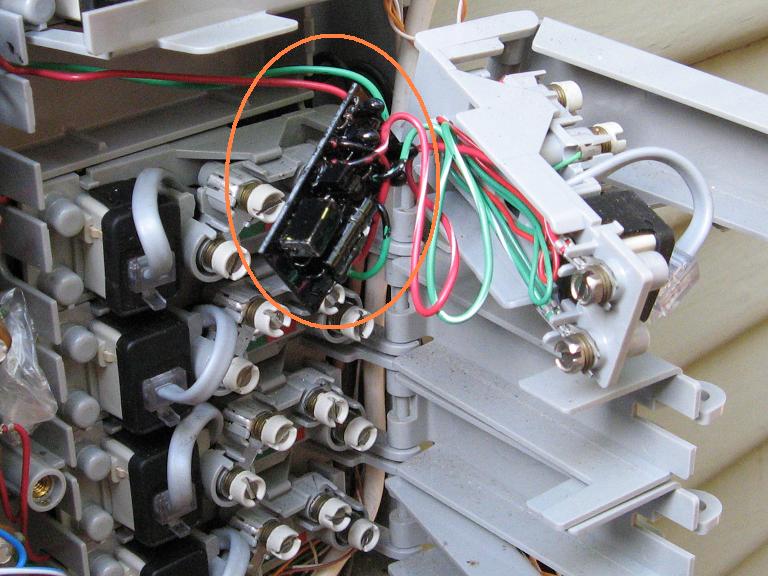
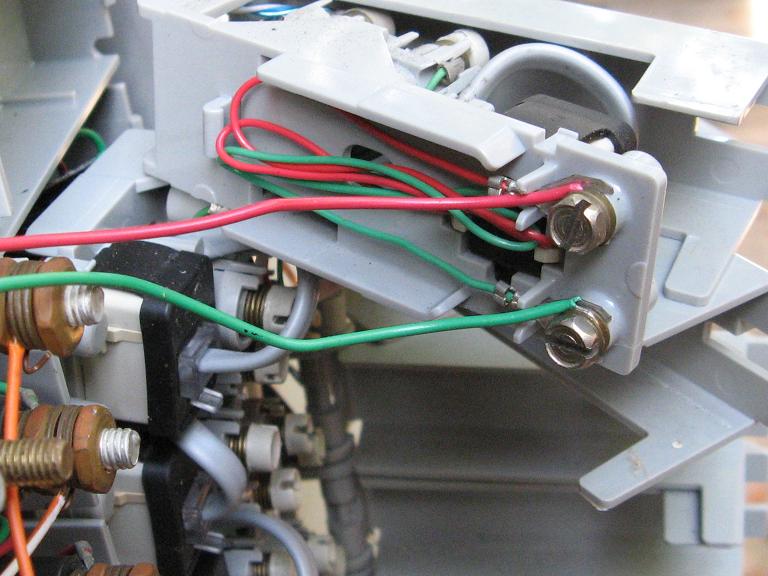
The MTU is the little black circuit board here, behind the terminals. It is wired in series with the inside wiring so I can’t just cut it out. Some people cut it out and then use gel-filled wire nuts to splice the wires. I chose an easier and less clean route of stripping the wires and attaching them directly to the screws on the right side.

The finished wiring job

I repeated this for both terminals that were in use. I didn’t bother with the others for now. Finally, I put everything back together and tested for dial tone. DSL was working and the problem was gone!

Here are some other links to info about this problem and pictures of other MTU devices.

All in all, this wasted about 6 hours of my time troubleshooting, calling AT&T, explaining it to the tech, etc. Too bad I can’t bill them for my time. I hope this article will save your time and that the telcos will educate their support staff more on this very common problem.

Introducing xum1541: the fast C64 floppy USB adapter

I’ve been working on a project in my spare time that I’m now ready to announce. It is a USB interface for the C64 1541 floppy drive, which allows it to be connected to a modern PC. In conjunction with the OpenCBM software, this allows files and whole disk images to be transferred to and from the drive.

Previously, there were a number of ways to connect your PC to a 1541, but they all required a built-in printer port. These have become rare on modern systems. USB is the logical choice for a new adapter but has its own complexities.

In 2007, the xu1541 project by Till Harbaum developed a simple USB adapter. This was a nice improvement. On the plus side, the hardware was very cheap to build and it offered decent compatibility. However, the device was slow due to implementing the USB protocol in software and required a lot of skill to set up since it had to be hand-built and bootstrapped with JTAG.

The xum1541 (pronounced “zoom”) is built from a modified version of the xu1541 firmware. It is a USB full speed device and supports high-speed parallel cables. The hardware USB support significantly speeds up transfers. It will support mnib (aka nibtools), which provides low-level imaging to backup copy protected disks. I’m most excited about this feature since it is critical to archiving original floppies for the C64 Preservation Project.

The first version of the hardware is based on the AT90USBKEY development board. This board costs about $30 and comes with a preinstalled USB bootloader. To turn it into an xum1541, it just needs a small daughtercard for the IEC connectors and parallel cable. It’s easy to upload the firmware with the Atmel FLIP software, no JTAG cable needed. I’m hoping that future versions will be a fully custom board and that someone will manufacture them for users who don’t have any hardware skills.

xum1541 USB floppy adapter

The project is currently in the alpha stage. I have a working firmware that is mostly compatible with the xu1541. It runs out of the CVS version of OpenCBM and works although it has a few bugs. I’m currently working to implement nibbler support and to improve the transfer speed. I’m trying to do this without sacrificing too much xu1541 compatibility to keep the OpenCBM software changes minimal.

Both Wolfgang Moser and Spiro Trikaliotis have been helpful on this project. Wolfgang has been testing my firmware on his own setup, so there are two xum1541s in existence now. Also, he has been prototyping various designs for both a daughterboard for the USBKEY and the second version of the xum1541, which would not be based on the USBKEY developer’s kit. Instead, it would be a fully custom board which will allow it to be even cheaper. Spiro has assisted with debugging some IEC problems.

Wolfgang Moser's xum1541

All of this is in the early stages so no promises on delivery date. The last 10% of a project is always 90% of the effort. The first step is to finish support for the nibbler protocol and improve performance. Next, we will polish the firmware and OpenCBM software to support the new device (too many #ifdefs right now). The first release would provide firmware and software for people willing to build their own daughterboard for the USBKEY. Eventually, I hope there would be custom boards available for those who don’t want to build anything.

This project has been a lot of fun, and I look forward to posting more updates soon. Here’s a video of the xum1541 in operation: