Fixing DSL lost sync problem

I have had an annoying problem for almost a year. Whenever someone picks up our phone, the DSL modem would lose sync for a minute. Usually that was enough for some connections to time out. Since we don’t use the home phone much, I put up with this longer than I should have.

I called AT&T to have them check out the line. It passed their automated line test. Before this, I had carefully narrowed down the problem. I unplugged all phones from their jacks and made sure each had a proper DSL filter on them. I checked the alarm system. I tried with a different phone to be sure it wasn’t that. I moved the DSL modem to another jack. No difference. Picking up the phone or going back on hook would cause the modem to lose sync. At all other times, it was fine.

The tech came out and did some line quality tests. We disconnected the internal wiring and plugged the DSL modem directly into the external wiring. The problem still happened. He called for some assistance but his support was baffled too. He finally apologized and said maybe the modem was bad.

Last night, I tried with a different modem and had the same issue. I did some more looking and found a bit of information on this. Back in the old days, Pac Bell would install an MTU (maintenance test unit) or “half ringer”. This device allowed them to do a line test without the customer being involved. However, the voltage change of going on-hook causes it to “bounce” the line. Before DSL, this didn’t matter because no one was on the line to hear the bounce. DSL is like an always-on modem connection so any noise or interruption will cause it to restart the sync cycle and you lose your Internet for a minute.

I dug into my telco box (NID) this morning and found this was the problem. To prevent others from wasting hours arguing with phone support that there really is a line problem, here’s how to diagnose this yourself. I’ll use my box as an example, but keep in mind these devices come in various shapes.

Telco box (NID) from the outside

First, find your telco box. This is where wires enter from the street and connections are made to your inside wiring. There’s a screw on the right that allows you to open the cover.

Inside the telco box

Once you open the cover, you’ll see two sections. The inside wiring is on the right and is accessible by opening each terminal cover. The telco side uses a special screw so it’s harder for you to open. In most cases, you won’t need to open that side anyway. As you can see, only the top two terminals of my box are in use for inside wiring. The others are still available. If removing an MTU, you only need to do it from lines that are actually used. I found that every single one of these terminals had an MTU behind it!

Inside AT&T's side of the point of demarcation

Just to be thorough, I checked inside AT&T’s side of the terminals. Indeed there is no MTU here, just some wiring posts.
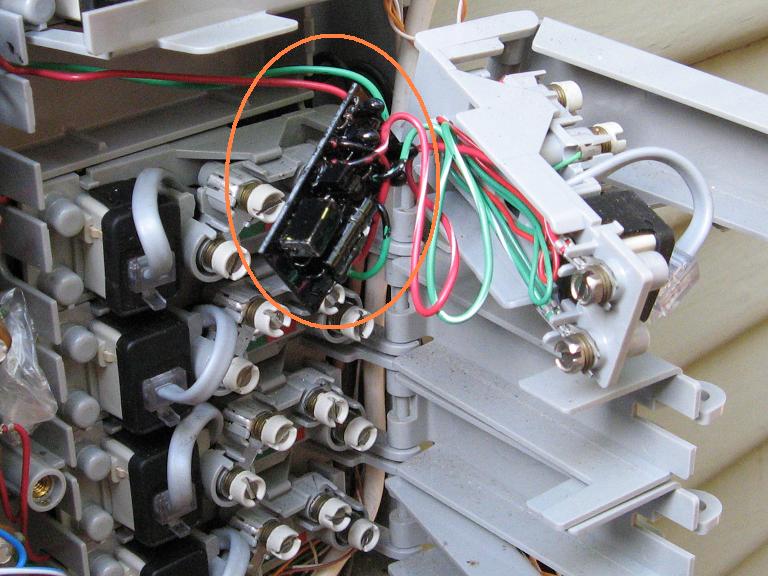
Finding the MTU
Finding an MTU

The MTU is the little black circuit board here, behind the terminals. It is wired in series with the inside wiring so I can’t just cut it out. Some people cut it out and then use gel-filled wire nuts to splice the wires. I chose an easier and less clean route of stripping the wires and attaching them directly to the screws on the right side.
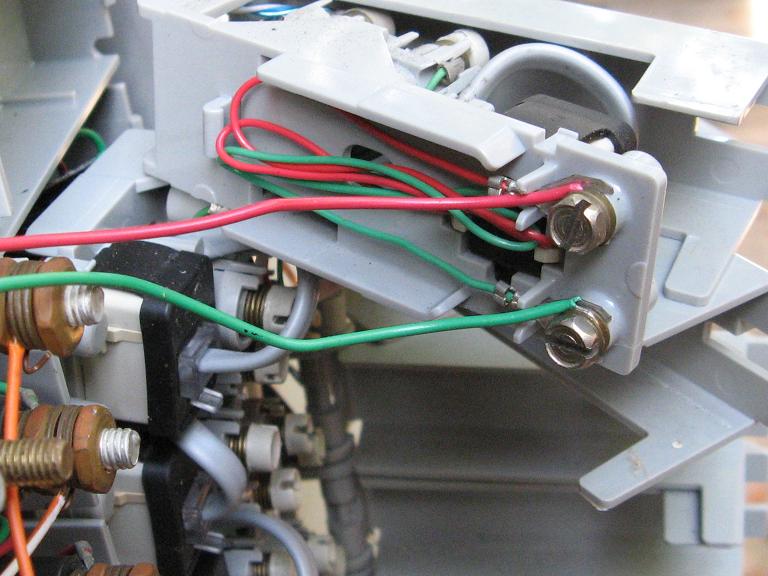
The finished wiring job

I repeated this for both terminals that were in use. I didn’t bother with the others for now. Finally, I put everything back together and tested for dial tone. DSL was working and the problem was gone!

Here are some other links to info about this problem and pictures of other MTU devices.

All in all, this wasted about 6 hours of my time troubleshooting, calling AT&T, explaining it to the tech, etc. Too bad I can’t bill them for my time. I hope this article will save your time and that the telcos will educate their support staff more on this very common problem.

Introducing xum1541: the fast C64 floppy USB adapter

I’ve been working on a project in my spare time that I’m now ready to announce. It is a USB interface for the C64 1541 floppy drive, which allows it to be connected to a modern PC. In conjunction with the OpenCBM software, this allows files and whole disk images to be transferred to and from the drive.

Previously, there were a number of ways to connect your PC to a 1541, but they all required a built-in printer port. These have become rare on modern systems. USB is the logical choice for a new adapter but has its own complexities.

In 2007, the xu1541 project by Till Harbaum developed a simple USB adapter. This was a nice improvement. On the plus side, the hardware was very cheap to build and it offered decent compatibility. However, the device was slow due to implementing the USB protocol in software and required a lot of skill to set up since it had to be hand-built and bootstrapped with JTAG.

The xum1541 (pronounced “zoom”) is built from a modified version of the xu1541 firmware. It is a USB full speed device and supports high-speed parallel cables. The hardware USB support significantly speeds up transfers. It will support mnib (aka nibtools), which provides low-level imaging to backup copy protected disks. I’m most excited about this feature since it is critical to archiving original floppies for the C64 Preservation Project.

The first version of the hardware is based on the AT90USBKEY development board. This board costs about $30 and comes with a preinstalled USB bootloader. To turn it into an xum1541, it just needs a small daughtercard for the IEC connectors and parallel cable. It’s easy to upload the firmware with the Atmel FLIP software, no JTAG cable needed. I’m hoping that future versions will be a fully custom board and that someone will manufacture them for users who don’t have any hardware skills.

xum1541 USB floppy adapter

The project is currently in the alpha stage. I have a working firmware that is mostly compatible with the xu1541. It runs out of the CVS version of OpenCBM and works although it has a few bugs. I’m currently working to implement nibbler support and to improve the transfer speed. I’m trying to do this without sacrificing too much xu1541 compatibility to keep the OpenCBM software changes minimal.

Both Wolfgang Moser and Spiro Trikaliotis have been helpful on this project. Wolfgang has been testing my firmware on his own setup, so there are two xum1541s in existence now. Also, he has been prototyping various designs for both a daughterboard for the USBKEY and the second version of the xum1541, which would not be based on the USBKEY developer’s kit. Instead, it would be a fully custom board which will allow it to be even cheaper. Spiro has assisted with debugging some IEC problems.

Wolfgang Moser's xum1541

All of this is in the early stages so no promises on delivery date. The last 10% of a project is always 90% of the effort. The first step is to finish support for the nibbler protocol and improve performance. Next, we will polish the firmware and OpenCBM software to support the new device (too many #ifdefs right now). The first release would provide firmware and software for people willing to build their own daughterboard for the USBKEY. Eventually, I hope there would be custom boards available for those who don’t want to build anything.

This project has been a lot of fun, and I look forward to posting more updates soon. Here’s a video of the xum1541 in operation:

Next Baysec: January 15th at Gordon Biersch

The next Baysec meeting is this Thursday at Gordon Biersch. Come out and meet fellow security people from all over the Bay Area. As always, this is not a sponsored meeting, there is no agenda or speakers, and no RSVP is needed. Thanks go to Ryan Russell for planning all this.

See you January 15th, 7-11 pm.

Gordon Biersch
2 Harrison St
San Francisco, CA 94105
(415) 243-8246

Forged CA cert talk at 25C3

A talk entitled “MD5 considered harmful today” (slides) is being presented at 25C3. The authors describe forging a CA cert that will be accepted by all browsers by exploiting the fact that several trusted root CAs sign certs with MD5. This allows them to spoof their identity as any SSL-enabled website on the Internet, and it will look perfectly valid to the user.

The growth of trusted root CAs included in standard browsers has been an issue for a while. Every root CA is equal in the eyes of the browser, thus the end-user’s security is equivalent to the security of the weakest root CA. The default Firefox install will accept a Yahoo cert signed by “TurkTrust”, or any other of more than 100 root certs. I don’t know how good each of those companies are at securing their keys, implementing strict cert chain validation, and checking the identity of every submitter. So, it’s a good bet that putting crypto authority in the hands of that many people will result in some failures, repeatedly.

The attack is interesting since they take advantage of more than one flaw in a CA. First, they find a CA that still uses MD5 for signing certs. MD5 has been broken for years, and no CA should have been doing this. Next, they prepared an innocent-looking cert request containing the “magic values” necessary to cause an MD5 collision. They were able to do this because of a second flaw. The CA in question used an incrementing serial number instead of a random one. Since the serial is part of the signed data, it is a cheap way to get some randomness. This would have thwarted this particular attack until a pre-image vulnerability was found in MD5. Don’t count on this for security! MD4 fell to a second pre-image attack a few years after the first collision attacks, and attacks only get better over time.

This talk definitely points out that crypto attacks are not being addressed quickly enough in the real world. While it is difficult to roll out a new root CA cert, it’s better to do so over the years we have known MD5 to be insecure than in a rush after an attack has already occurred. Another excellent talk at 25C3 on the iPhone described how the baseband processor was compromised via the lack of validation of RSA signature padding. What’s intriguing is that Apple’s own RSA implementation in their CDSA code was not vulnerable to this flaw, but apparently a different vendor supplied the baseband code.

To paraphrase Gibson, “Crypto security is available already, it just isn’t equally distributed.”

More dangers of amateur crypto

The Good Math blog continues to inadvertently provide examples of how subtle mistakes in cryptography are often fatal. I previously wrote about how slightly incorrect crypto examples on a reputable blog can lead engineers astray. The latest post about RSA is no exception, but I’ll have to write about it here since my comment was deleted. The comments by Oscar on that post are a good criticism.

The most important error in Mark’s description of RSA is that his example for encryption uses the private key D, instead of the public key E. The result of the RSA private key operation with D is called the “CipherText”. The decryption process is described using the public key E.

At first glance, this seems like an awkward description but still sound, right? If you wanted to exchange RSA-encrypted messages between two systems, couldn’t you just generate an RSA key pair and keep both keys secret? The surprising result is that this is completely insecure, and it is impossible to keep an RSA public key secret, even if the key (E, N) is never revealed.

I previously wrote a series of posts about a system that made this exact mistake. The manufacturer had burned an RSA public key (E, N) into a chip in order to verify a signature on code updates. This is perfectly fine, assuming the implementation was correct. However, they additionally wanted to use the same public key parameters to decrypt the message, keeping E and N secret. In the first article, I described this system and in the second, I discussed how to attack it given that the attacker has seen only two encrypted/signed updates. In summary, the modulus N is partially revealed by each message you see “encrypted” with (D, N) and the GCD quickly computes it.

Subtle details matter, especially in public key crypto. The two keys in an RSA pair are indeed asymmetric, and have very different properties. They cannot be substituted for each other. You cannot securely encrypt a message using the private key (D, N). Such a system would be completely insecure.

Next Baysec: November 20 at Gordon Biersch

The next Baysec meeting is this Thursday at Gordon Biersch. Come out and meet fellow security people from all over the Bay Area. As always, this is not a sponsored meeting, there is no agenda or speakers, and no RSVP is needed. Thanks go to Ryan Russell for planning all this.

See you November 20th, 7-11 pm.

Gordon Biersch
2 Harrison St
San Francisco, CA 94105
(415) 243-8246