Next Baysec: January 15th at Gordon Biersch

The next Baysec meeting is this Thursday at Gordon Biersch. Come out and meet fellow security people from all over the Bay Area. As always, this is not a sponsored meeting, there is no agenda or speakers, and no RSVP is needed. Thanks go to Ryan Russell for planning all this.

See you January 15th, 7-11 pm.

Gordon Biersch
2 Harrison St
San Francisco, CA 94105
(415) 243-8246

Forged CA cert talk at 25C3

A talk entitled “MD5 considered harmful today” (slides) is being presented at 25C3. The authors describe forging a CA cert that will be accepted by all browsers by exploiting the fact that several trusted root CAs sign certs with MD5. This allows them to spoof their identity as any SSL-enabled website on the Internet, and it will look perfectly valid to the user.

The growth of trusted root CAs included in standard browsers has been an issue for a while. Every root CA is equal in the eyes of the browser, thus the end-user’s security is equivalent to the security of the weakest root CA. The default Firefox install will accept a Yahoo cert signed by “TurkTrust”, or any other of more than 100 root certs. I don’t know how good each of those companies are at securing their keys, implementing strict cert chain validation, and checking the identity of every submitter. So, it’s a good bet that putting crypto authority in the hands of that many people will result in some failures, repeatedly.

The attack is interesting since they take advantage of more than one flaw in a CA. First, they find a CA that still uses MD5 for signing certs. MD5 has been broken for years, and no CA should have been doing this. Next, they prepared an innocent-looking cert request containing the “magic values” necessary to cause an MD5 collision. They were able to do this because of a second flaw. The CA in question used an incrementing serial number instead of a random one. Since the serial is part of the signed data, it is a cheap way to get some randomness. This would have thwarted this particular attack until a pre-image vulnerability was found in MD5. Don’t count on this for security! MD4 fell to a second pre-image attack a few years after the first collision attacks, and attacks only get better over time.

This talk definitely points out that crypto attacks are not being addressed quickly enough in the real world. While it is difficult to roll out a new root CA cert, it’s better to do so over the years we have known MD5 to be insecure than in a rush after an attack has already occurred. Another excellent talk at 25C3 on the iPhone described how the baseband processor was compromised via the lack of validation of RSA signature padding. What’s intriguing is that Apple’s own RSA implementation in their CDSA code was not vulnerable to this flaw, but apparently a different vendor supplied the baseband code.

To paraphrase Gibson, “Crypto security is available already, it just isn’t equally distributed.”

More dangers of amateur crypto

The Good Math blog continues to inadvertently provide examples of how subtle mistakes in cryptography are often fatal. I previously wrote about how slightly incorrect crypto examples on a reputable blog can lead engineers astray. The latest post about RSA is no exception, but I’ll have to write about it here since my comment was deleted. The comments by Oscar on that post are a good criticism.

The most important error in Mark’s description of RSA is that his example for encryption uses the private key D, instead of the public key E. The result of the RSA private key operation with D is called the “CipherText”. The decryption process is described using the public key E.

At first glance, this seems like an awkward description but still sound, right? If you wanted to exchange RSA-encrypted messages between two systems, couldn’t you just generate an RSA key pair and keep both keys secret? The surprising result is that this is completely insecure, and it is impossible to keep an RSA public key secret, even if the key (E, N) is never revealed.

I previously wrote a series of posts about a system that made this exact mistake. The manufacturer had burned an RSA public key (E, N) into a chip in order to verify a signature on code updates. This is perfectly fine, assuming the implementation was correct. However, they additionally wanted to use the same public key parameters to decrypt the message, keeping E and N secret. In the first article, I described this system and in the second, I discussed how to attack it given that the attacker has seen only two encrypted/signed updates. In summary, the modulus N is partially revealed by each message you see “encrypted” with (D, N) and the GCD quickly computes it.

Subtle details matter, especially in public key crypto. The two keys in an RSA pair are indeed asymmetric, and have very different properties. They cannot be substituted for each other. You cannot securely encrypt a message using the private key (D, N). Such a system would be completely insecure.

Next Baysec: November 20 at Gordon Biersch

The next Baysec meeting is this Thursday at Gordon Biersch. Come out and meet fellow security people from all over the Bay Area. As always, this is not a sponsored meeting, there is no agenda or speakers, and no RSVP is needed. Thanks go to Ryan Russell for planning all this.

See you November 20th, 7-11 pm.

Gordon Biersch
2 Harrison St
San Francisco, CA 94105
(415) 243-8246

DIY USB to TTL serial adapter

When people ask about my day job, I tell them it is “designing/reviewing embedded security and cryptography”.  I haven’t written much on this blog about my embedded work, mostly due to NDAs.  However, I recently have been working on some hobby projects in my spare time that are a good topic for some articles.

When interfacing with an external board over USB, it’s often easiest to use a USB-serial cable like the FTDI 232R.  This cable provides a virtual serial port interface to the PC host and the normal serial signals at the target.  You can then interact with your target using an ordinary terminal program.  One key difference is that the signals are LVTTL (0 – 3.3V) or TTL (0 – 5V), while ordinary serial is -10V to +10V.  So you can’t just use an ordinary USB-serial adapter, the kind used to connect an old PDA to your computer.

On a recent project, I needed to debug some code running in a microcontroller.  Since most microcontrollers these days have a built-in UART, debug prints can be added by configuring the clock divider for the given baud rate and monitoring a single pin (the RX pin).  With AVR libc, it’s as simple as providing a “send byte” routine to a local copy of stdout, then calling printf() as usual.  As I dug through my parts bin, I realized I didn’t have one of these FTDI cables and it was too late to buy anything.

My first thought was to use one of my scope probes to capture the serial I/O and decode it in software.  You can dump an oscilloscope’s trace buffer to a file, then walk through the samples for your given channel and recover the original data.  I decided this would take too long though, so I got a second opinion from bunnie.  I was hoping to scavenge one of the many ordinary USB-serial adapters I had lying around.  He told me that most of them are built with a separate level converter IC, so it was likely I could mod one to get what I wanted.

That was the motivation I needed to tear into an adapter.  It was covered with injection-molded plastic, so I had to use a knife to slice the edges and peel it back.  Inside, I found it had a FTDI 232BL, Sipe SP213ECA, and Atmel 93C46.  I think the Atmel is a serial EEPROM (8-pin, SOIC). If you search for the “Sipe” part, you will see a bunch of Chinese “part number squatters”.  That’s usually the tell-tale sign that a part isn’t sold via retail and is only used by OEMs as a clone.  I think the copied manufacturer is “Sipex”, so I used that datasheet. The FTDI chip is quite common and does all the logic for the USB and serial protocols.

The Sipex chip is a level converter, similar to the MAX232.  It uses a series of capacitors in a configuration called a “charge pump” to step the voltage up or down to +/-10V, while requiring only a 3.3V source of power.

My plan was to bypass the level shifter and connect my TX, RX, and GND pins directly from my microcontroller to the FTDI chip since both run at 3.3V.  However, I needed to disconnect the RX stage of the level shifter from the FTDI, otherwise there could be contention if my microcontroller was driving logic low and the FTDI was driving high.  I looked at the Sipe datasheet and did some investigation with my multimeter.  It turns out that the RX signal comes in from the serial port on pin 23 and goes out at the reduced TTL level on pin 22.

I could have cut pin 22 with a knife but that is hard to reverse if I wanted to put it back.  Instead, I used my soldering iron to release the pin and gently pry up on it.  This is called lifting a pin and is often done by techs doing rework.  I find it works best to nudge the pin sidewise with tweezers while heating it, then lift it.  You can lift a pin just a little if you only want to disconnect it, or you can lift it and bend it back over the package like I did if you plan to solder wire onto the pin and the pad.  I left it this way in case I wanted to add a switch in the future, allowing the same device to be used as a TTL or ordinary serial port.  (The ugly junk around the pins and under the chip is leftover plastic from the cover, a side-effect of the injection molding process.)

Next, I soldered ground, RX, and TX wires from the FTDI chip to a pin header.  I find it works best to put a little extra solder on the pins/pads and then apply heat above the wire until it melts into the solder on top of the pin.  Below is a picture of the header and the three wires.  The header isn’t connected to the serial port below, it’s actually floating above it.

Finally, I used a glob of hot glue to stabilize and insulate the header from the other connections on the chip as below.
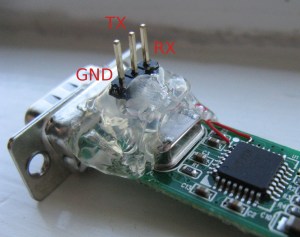
I tested for shorts between pins and between Vcc and ground (very important).  It seemed fine so I plugged it in.  I needed a cable to match the pinouts of my microcontroller and the USB-serial adapter, so I took an old ribbon cable and swapped some of the wires around to match.  I find ribbon cables are really useful for building custom cables quickly since the tabs on the connectors come apart easily with a screwdriver and it presses back together once you’re done.  Below is the final result, about 45 minutes of work.

By the way, if you need an overview of the basics, here is an excellent intro to surface-mount soldering.  I especially agree with its complaint against the “flood and wick” style of SMT soldering.  I hope this article encourages you to find creative solutions to your interfacing problems.