Fixing DSL lost sync problem

I have had an annoying problem for almost a year. Whenever someone picks up our phone, the DSL modem would lose sync for a minute. Usually that was enough for some connections to time out. Since we don’t use the home phone much, I put up with this longer than I should have.

I called AT&T to have them check out the line. It passed their automated line test. Before this, I had carefully narrowed down the problem. I unplugged all phones from their jacks and made sure each had a proper DSL filter on them. I checked the alarm system. I tried with a different phone to be sure it wasn’t that. I moved the DSL modem to another jack. No difference. Picking up the phone or going back on hook would cause the modem to lose sync. At all other times, it was fine.

The tech came out and did some line quality tests. We disconnected the internal wiring and plugged the DSL modem directly into the external wiring. The problem still happened. He called for some assistance but his support was baffled too. He finally apologized and said maybe the modem was bad.

Last night, I tried with a different modem and had the same issue. I did some more looking and found a bit of information on this. Back in the old days, Pac Bell would install an MTU (maintenance test unit) or “half ringer”. This device allowed them to do a line test without the customer being involved. However, the voltage change of going on-hook causes it to “bounce” the line. Before DSL, this didn’t matter because no one was on the line to hear the bounce. DSL is like an always-on modem connection so any noise or interruption will cause it to restart the sync cycle and you lose your Internet for a minute.

I dug into my telco box (NID) this morning and found this was the problem. To prevent others from wasting hours arguing with phone support that there really is a line problem, here’s how to diagnose this yourself. I’ll use my box as an example, but keep in mind these devices come in various shapes.

Telco box (NID) from the outside

First, find your telco box. This is where wires enter from the street and connections are made to your inside wiring. There’s a screw on the right that allows you to open the cover.

Inside the telco box

Once you open the cover, you’ll see two sections. The inside wiring is on the right and is accessible by opening each terminal cover. The telco side uses a special screw so it’s harder for you to open. In most cases, you won’t need to open that side anyway. As you can see, only the top two terminals of my box are in use for inside wiring. The others are still available. If removing an MTU, you only need to do it from lines that are actually used. I found that every single one of these terminals had an MTU behind it!

Inside AT&T's side of the point of demarcation

Just to be thorough, I checked inside AT&T’s side of the terminals. Indeed there is no MTU here, just some wiring posts.
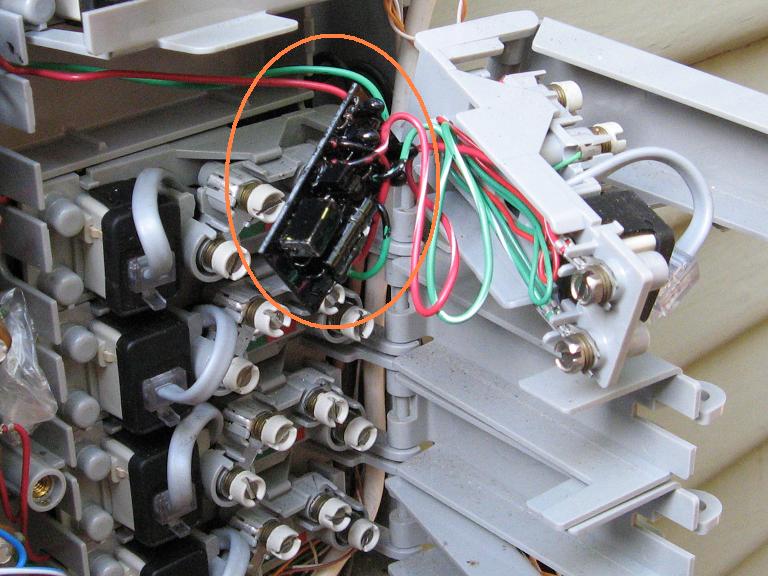
Finding the MTU
Finding an MTU

The MTU is the little black circuit board here, behind the terminals. It is wired in series with the inside wiring so I can’t just cut it out. Some people cut it out and then use gel-filled wire nuts to splice the wires. I chose an easier and less clean route of stripping the wires and attaching them directly to the screws on the right side.
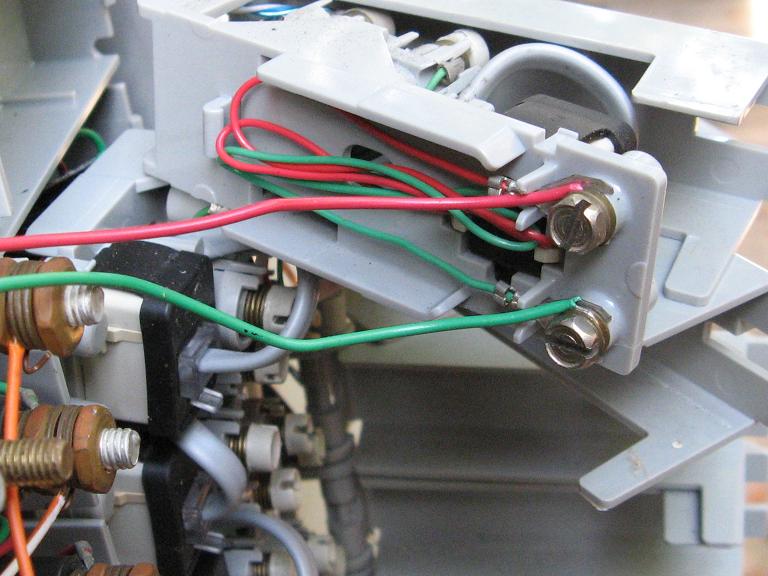
The finished wiring job

I repeated this for both terminals that were in use. I didn’t bother with the others for now. Finally, I put everything back together and tested for dial tone. DSL was working and the problem was gone!

Here are some other links to info about this problem and pictures of other MTU devices.

All in all, this wasted about 6 hours of my time troubleshooting, calling AT&T, explaining it to the tech, etc. Too bad I can’t bill them for my time. I hope this article will save your time and that the telcos will educate their support staff more on this very common problem.

Recent Python annoyances

I like the python language but you know there are design errors if you make the same mistakes multiple times.  While I know the correct way to avoid these problems, I still occasionally fall into these traps.  Here is a brief summary of recent bugs I’ve found that I or someone else made repeatedly.

Container objects are not copied on assignment

Container objects only contain references to their contents, not the objects themselves.  Additionally, creating a duplicate container object through assignment only creates a reference to the other container, not a new copy of the container.  You have to use the copy class or the [:] operator if you want to destructively operate on a list without changing the original.

>>> a = [1, 2]
>>> b = a
>>> c = a[:]
>>> a.reverse()
>>> (b, c)
([2, 1], [1, 2])

Different arguments to str.join and os.path.join

Join takes a collection of arguments and combines them with a separator.  The problem is that a regular string join takes a collection object (list, tuple, set, etc.) while os.path.join only takes a series of arguments.  This difference is gratuitous.  To work around this, use the *arg form:

>>> '/'.join(['1', '2'])
'1/2'
>>> os.path.join(*['1', '2'])
'1/2'

Ugly xml.dom.minidom.toprettyxml() output

When parsing XML, the minidom class embeds whitespace Text elements in your tree between the Nodes themselves.  I usually discard those nodes during parsing since they are useless.

Even if you do this, the toprettyxml() method has terrible output.  It actually adds whitespace to the internal Text elements of a tag to indent them.  Since this changes the contents of the tags, I don’t know why this is even valid.  See the extra newlines and tabs around “EXAMPLE” below.

>>> from xml.dom.minidom import parseString
>>>
a = '<?xml version="1.0"?><tag>EXAMPLE</tag>'
>>> parseString(a).toprettyxml()
u'<?xml version="1.0" ?>\n<tag>\n\tEXAMPLE\n</tag>\n'

To avoid this behavior, I implement my own toprettyxml() method.

Destructive iteration on xml.dom.minidom elements

If you plan to replace XML nodes in the tree, you have to remove them first and then add your own.  If you iterate on the childNodes of a node and attempt to delete them, the iteration may skip some nodes.  The documentation for the python xml class is pretty spartan, expecting you to refer to the W3C docs instead.

net = self.dom.getElementsByTagName('network')
# WRONG!
for n in net.childNodes:
    net.removeChild(n)
# Correct
while net.childNodes.length > 0:
    net.removeChild(net.firstChild)

zipfile class has poor support for archive extensions

The zipfile class that comes with current releases has some big limitations.  It does not fully handle extensions like zip comment fields, 64-bit archives, archives with lots of entries, etc.  Fortunately, fixes have been made in the repository version but they haven’t made it into a release yet.  I use a copy from directly from SVN.

Catching multiple exceptions syntax

This one is annoying because it silently does the wrong thing. It occurs when you want to catch multiple exceptions.

#WRONG!
except ValueError, OSError:
# Correct
except (ValueError, OSError):

The first one catches ValueError and assigns the first argument of the exception to the name “OSError”. Since this overrides an existing object (in the __builtins__ namespace, no less), it would make sense to issue a warning here. I don’t know if python has the concept of a lint mode for catching possible mistakes, but it would be nice.

[Edit: added the multiple exceptions example]

Thunderbird and cygwin annoyances

When I find a functional bug in an application, I think it’s useful to post the solution for others to find.  Here are two recent problems I solved.

Thunderbird allows you to switch SMTP servers.  However, sometimes it appeared like the setting change wasn’t taking effect.  While I’d change the server, some mail would still use the old setting and some would use the new.  Even plug-ins designed to help with this didn’t work reliably.

I tracked this down to the Identities feature.  It allows you to set up different identities (email addresses) under a single account.  This means that with two identities, there are actually three different places the SMTP server and other information is set.  The global account settings panel (Tools -> Account Settings -> Outgoing Server (SMTP)) and all identities (… -> Manage Identities -> Edit each profile) need to be changed in order to switch servers.  While I agree that some things make sense to make local to an identity (e.g., signature file), SMTP server should only be a per-account setting.

I like using cygwin on Windows for a somewhat reasonable Unix-like environment.  There are two shells that can be used: bash and rxvt.  The bash shell runs within a Windows command prompt instance, and inherits the same annoyances from there.  Text selection works differently, there is no real terminal emulation, and scrollback is not reliable.  I switched to rxvt to fix a lot of those problems, but had to keep bash around for one reason.  When I tried to run Windows python from rxvt, it would just hang during startup.  The cygwin python worked fine.

It turns out that the rxvt code allocates a pty.  You can see this by typing “tty” in both bash and rxvt.  The former reports “/dev/console” and the latter, something like “/dev/tty1”.  I believe the reason is that Windows consoles (and thus bash) actually use a separate API for working with the user.  Thus, Windows python calls to that API hang if the shell isn’t actually running in the console.

This is similar to an experience I had trying to do asynchronous IO with a Windows console.  I had written a small serial port comms tool that would work interactively, printing output when the device generated it and accepting input from the user.  It worked fine until the user started typing, then the input routine would block.  Nothing worked with it, not WFMO, setting asynchronous mode on the stdin handle and polling, or even threads.  A read from the console blocks all process execution, including all the process’s threads, until the input is completed.

I hope this helps you if you encounter similar problems.

FasTrak findings are serious

I haven’t revealed all the details yet about my Blackhat talk on RFID toll pass security.  One reason was I hoped to speak with Bay Area transit officials to alert them beforehand.  The other reason is that I’ve still been analyzing the potential impact of the flaws I found.

Well, the results are in and it’s pretty serious.  I’m reasonably certain an attacker can send a couple messages to a FasTrak transponder and wipe its internal ID.  Also, the ID can be overwritten with a different one.  There is a population of at least 1 million of these vulnerable transponders in California, sold over the past 15 years.  They conduct 50 million transactions per year on Bay Area bridges.  This does not include their use on southern California toll roads.

I think this is a big deal.  If anyone reading this is responsible for engineering at FasTrak, please contact me.  The messages I’ve sent via your website haven’t worked.  Thanks.

Hacker or hooker?

Well-funded and motivated attackers are typically the hardest to defend against when designing a system.  Governments can attack systems in different ways and with more resources than a typical threat.  Consider a recent example where a British aide lost his Blackberry after spending the night with a woman who approached him in a Chinese disco.  While it’s possible he just lost it while drunk, this is a good example of how unconventional threats need to be carefully considered.

Let’s analyze the cost of two routes to getting this same information: hacker or hooker.  The hacker might try to crack passwords or develop a 0-day exploit against the Blackberry server.  Or, build a custom trojan and send it via a forged email that appears to come from the Prime Minister.  The hooker would try to get to his hotel room and steal the phone.  It would actually suffice to just borrow it for a few minutes and dump the RAM since passwords are often cached there.  This has the added advantage that he might never know anything had happened.

A 0-day exploit could be in the $20,000 range.  Hiring someone to develop and target a trojan at this aide would be less, but the chance of succeeding would be lower.  According to the stories about Eliot Spitzer, a high-end call girl is $1,500 per hour.  Assuming it takes four hours, the total cost would be $6,000.  The fact that both these approaches could be done in China means the actual cost would be lower but probably still a similar ratio.

There are a lot of other advantages to the hooker approach besides cost.  There is good deniability if the call girl gets caught.  Since the call girl remains within the attacking country’s jurisdiction, the police can be used to recover the Blackberry if she makes an extortion attempt.  The hacker approach has a lot more uncertainty as flaws could be patched or blocked, making the exploit useless.

I also think this gives good support to my claim that software protection techniques are on the verge of wider adoption.  With cold boot attacks and growing news of governments seizing laptops or stealing cell phones, systems must remain secure even when an attacker has physical possession of a powered-up device.  The only way to do this is to adopt software and hardware techniques that are already used to protect games, DRM, and satellite TV.  Traditional approaches like those used in network security are no longer enough.

I’ll be speaking on this topic along with Thomas Ptacek at WOOT, co-hosted at USENIX on July 28th in San Jose.  Since this event is invite-only, send me email if you’re a security researcher who would like to attend.  Please include a brief summary of your background.

Next Baysec: June 19th at Pete’s Tavern

The next Baysec meeting is Thursday at Pete’s Tavern. Come out and meet fellow security people from all over the Bay Area.  As always, this is not a sponsored meeting, there is no agenda or speakers, and no RSVP is needed.  Thanks go to Ryan for planning all this.

See you on Thursday, June 19th, 7-11 pm.

Pete’s Tavern
128 King St. (at 2nd)
San Francisco