TPM hardware attacks (part 2)

Previously, I described a recent attack on TPMs that only requires a short piece of wire. Dartmouth researchers used it to reset the TPM and then insert known-good hashes in the TPM’s PCRs. The TPM version 1.2 spec has changes to address such simple hardware attacks.

It takes a bit of work to piece together the 1.2 changes since they aren’t all in one spec. The TPM 1.2 changes spec introduces the concept of “locality”, the LPC 1.1 spec describes new firmware messages, and other information available from Google show how it all fits together.

In the TPM 1.1 spec, the PCRs were reset when the TPM was reset, and software could write to them on a “first come, first served” basis. However, in the 1.2 spec, setting certain PCRs requires a new locality message. Locality 4 is only active in a special hardware mode. This special hardware mode corresponds in the PC architecture to the SENTER instruction.

Intel SMX (now “TXT”, formerly “LT”) adds a new instruction called SENTER. AMD has a similiar instruction called SKINIT. This instruction performs the following steps:

  1. Load a module into RAM (usually stored in the BIOS)
  2. Lock it into cache
  3. Verify its signature
  4. Hash the module into a PCR at locality 4
  5. Enable certain new chipset registers
  6. Begin executing it

This authenticated code (AC) module then hashes the OS boot loader into a PCR at locality 3, disables the special chipset registers, and continues the boot sequence. Each time the locality level is lowered, it can’t be raised again. This means the AC module can’t overwrite the locality 4 hash and the boot loader can’t overwrite the locality 3 hash.

Locality is implemented in hardware by the chipset using the new LPC firmware commands to encapsulate messages to the TPM. Version 1.1 chipsets will not send those commands. However, a man-in-the-middle device can be built with a simple microcontroller attached to the LPC bus. While more complex than a single wire, it’s well within range of modchip manufacturers.

This microcontroller would be attached to the clock, frame, and 4-bit address/data bus, 6 lines in total. While the LPC bus is idle, this device could drive the frame and A/D lines to insert a locality 4 “reset PCR” message. Malicious software could then load whatever value it wanted into the PCRs. No one has implemented this attack as far as I know, but it has been discussed numerous times.

What is the TCG going to do about this? Probably nothing. Hardware attacks are outside their scope, at least according to their documents.

“The commands that the trusted process sends to the TPM are the normal TPM commands with a modifier that indicates that the trusted process initiated the command… The assumption is that spoofing the modifier to the TPM requires more than just a simple hardware attack, but would require expertise and possibly special hardware.”

— Proof of Locality (section 16)

This shows why drawing an arbitrary attack profile and excluding anything that is outside it often fails. Too often, the list of excluded attacks does not realistically match the value of the protected data or underestimates the cost to attackers.

In the designers’ defense, any effort to add tamper-resistance to a PC is likely to fall short. There are too many interfaces, chips, manufacturers, and use cases involved. In a closed environment like a set-top box, security can be designed to match the only intended use for the hardware. With a PC, legacy support is very important and no single party owns the platform, despite the desires of some companies.

It will be interesting to see how TCPA companies respond to the inevitable modchips, if at all.
TPM hardware attacks

Trusted Computing has been a controversial addition to PCs since it was first announced as Palladium in 2002. Recently, a group at Dartmouth implemented an attack first described by Bernhard Kauer earlier this year. The attack is very simple, using only a 3-inch piece of wire. As with the Sharpie DRM hack, people are wondering how a system designed by a major industry group over such a long period could be so easily bypassed.

The PC implementation of version 1.1 of the Trusted Computing architecture works as follows. The boot ROM and then BIOS are the first software to run on the CPU. The BIOS stores a hash of the boot loader in the TPM’s PCR before executing it. A TPM-aware boot loader hashes the kernel, appends that value to the PCR, and executes the kernel. This continues on down the chain until the kernel is hashing individual applications.

How does software know it can trust this data? In addition to reading the SHA-1 hash from the PCR, it can ask the TPM to sign the response plus a challenge value using an RSA private key. This allows the software to be certain it’s talking to the actual TPM and no man-in-the-middle is lying about the PCR values. If it doesn’t verify this signature, it’s vulnerable to this MITM attack.

As an aside, the boot loader attack announced by Kumar et al isn’t really an attack on the TPM. They apparently patched the boot loader (a la eEye’s BootRoot) and then leveraged that vantage point to patch the Vista kernel. They got around Vista’s signature check routines by patching them to lie and always say “everything’s ok.” This is the realm of standard software protection and is not relevant to discussion about the TPM.

How does the software know that another component didn’t just overwrite the PCRs with spoofed but valid hashes? PCRs are “extend-only,” meaning they only add new values to the hash chain, they don’t allow overwriting old values. So why couldn’t an attacker just reset the TPM and start over? It’s possible a software attack could cause such a reset if a particular TPM was buggy, but it’s easier to attack the hardware.

The TPM is attached to a very simple bus known as LPC (Low Pin Count). This is the same bus used for Xbox1 modchips. This bus has a 4-bit address/data bus, 33 MHz clock, frame, and reset lines. It’s designed to host low-speed peripherals like serial/parallel ports and keyboard/mouse.

The Dartmouth researchers simply grounded the LPC reset line with a short wire while the system was running. From the video, you can see that the fan control and other components on the bus were also reset along with the TPM but the system keeps running. At this point, the PCRs are clear, just like at boot.  Now any software component could store known-good hashes in the TPM, subverting any auditing.

This particular attack was known before the 1.1 spec was released and was addressed in version 1.2 of the specifications. Why did it go unpatched for so long? Because it required non-trivial changes in the chipset and CPU that still aren’t fully deployed.

Next time, we’ll discuss a simple hardware attack that works against version 1.2 TPMs.

Undetectable hypervisor rootkit challenge

I’m starting to get some queries about the challenge Tom, Peter, and I issued to Joanna. In summary, we’ll be giving a talk at Blackhat showing how hypervisor-based rootkits are not invisible and the detector always has the fundamental advantage. Joanna’s work is very nice, but her claim that hypervisor rootkits are “100% undetectable” is simply not true. We want to prove that with code, not just words.

Joanna recently responded. In summary, she agrees to the challenge with the following caveats:

  • We can’t intentionally crash or halt the machine while scanning
  • We can’t consume more than 90% of the CPU for more than a second
  • We need to supply five new laptops, not two
  • We both provide source code to escrow before the challenge and it is released afterwards
  • We pay her $416,000

The first two requirements are easy to agree to. Of course, the rootkit also shouldn’t do either of those or it is trivially detectable by the user.

Five laptops? Sure, ok. The concern is that even a random guess could be right with 50% probability. She is right that we can make guessing a bad strategy by adding more laptops. But we can also do the same by just repeating the test several times. Each time we repeat the challenge, the probability that we’re just getting lucky goes down significantly. After five runs, the chance that we guessed correctly via random guesses is only 3%, the baseline she established for acceptability. But if she wants five laptops instead, that’s fine too.

I don’t have a problem open-sourcing the code afterwards. However, I don’t see why it’s necessary either. We can detect her software without knowing exactly how it’s implemented. That’s the point.

The final requirement is not surprising. She claims she has put four person-months work into the current Blue Pill and it would require twelve more person-months for her to be confident she could win the challenge. Additionally, she has all the experience of developing Blue Pill for the entire previous year.

We’ve put about one person-month into our detector software and have not been paid a cent to work on it. However, we’re confident even this minimal detector can succeed, hence the challenge. Our Blackhat talk will describe the fundamental principles that give the detector the advantage.

If Joanna’s time estimate is correct, it’s about 16 times harder to build a hypervisor rootkit than to detect it. I’d say that supports our findings.

[Edit: corrected the cost calculation from $384,000]

IBM Thinkpad overheating chipset fix

I’ve used Thinkpads for a long time for the relative build and BIOS quality, although recently I switched to the Panasonic Y series. I still have an IBM R32 for guests to use but recently it began blue screening randomly.

The symptoms were that it would run ok for a while, a couple hours to a few days, and then would get a STOP error in ati2advg.dll. Often, it would do this when beginning to play a video. I had tried various combinations of video drivers with little change. RAM tests showed no problems.

I found on various forums that the T42 and possibly other systems had a build problem where picking up the laptop by one corner would cause a heatsink to momentarily detach from the chipset, resulting in a similar blue screen. This sounded familiar, so I disassembled the laptop. (Disclaimer: doing so voids your warranty, I take no responsibility for your actions.)

Getting a copy of the hardware maintenance manual helps find all the screws and tabs. On most laptops, the first step is to get the keyboard removed and then other screws become accessible.

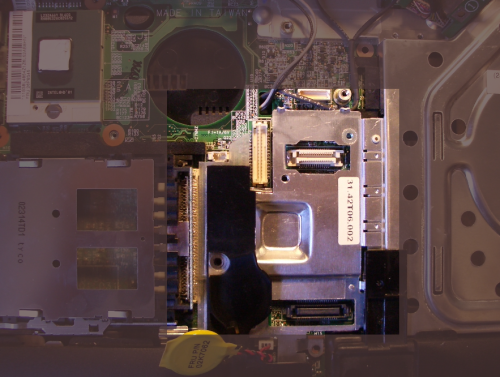
As you can see, the heatsink for the graphics chip is merely a piece of aluminum tied to the drive bay. It had a bit of sticky tape between it and the chip, but it didn’t make full contact with the chip below.

r32-4.png

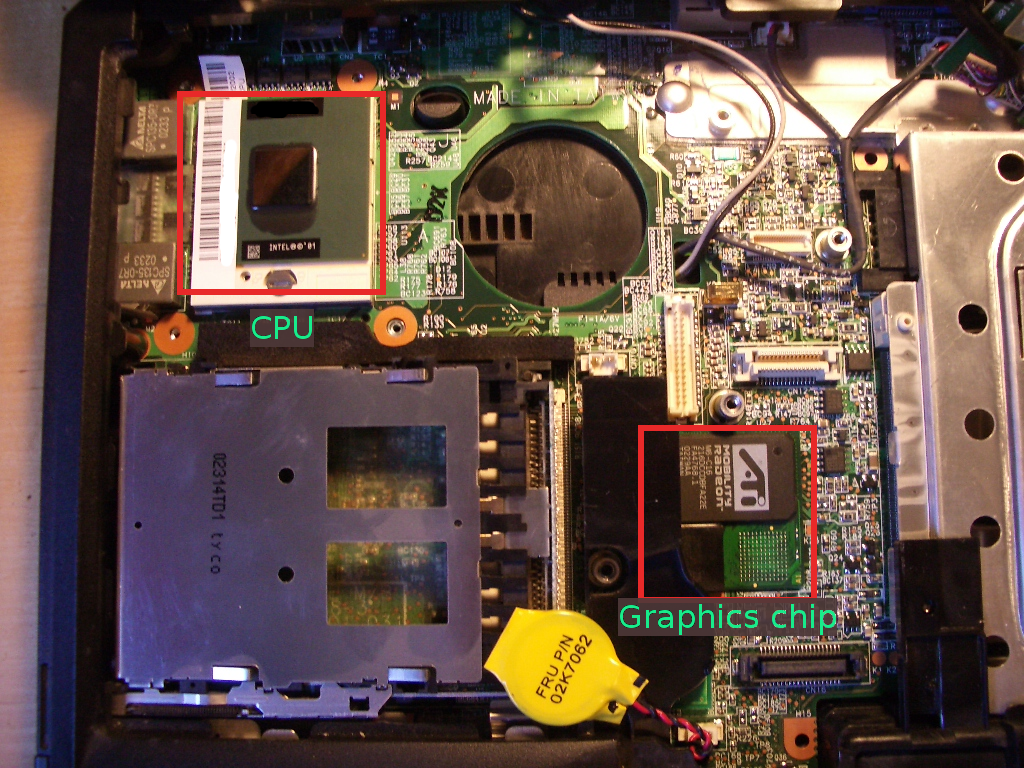
After removing the CPU and graphics chip heat sinks, you can see the CPU on the upper left and the graphics chip in the multi-chip module near the center. Since the chips on this small module are in an L-shape and the heatsink was centered, it only contacted the very edges of each of the chips.

r32-1.png

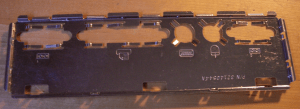
I decided this was likely the problem, so made a new heat spreader for the graphics chip while avoiding adding much weight. I took an old punch-out panel and cut a rectangle using my Dremel tool.

r32-2.png

After cutting, it looked like this:

r32-3.png

I put some heatsink compound on it and attached it to the graphics chips. To keep the corner from shorting out against the solder pads, I put a small square of double-stick tape in the empty space of the “L”. This helped secure the heat spreader, although I’m mostly depending on pressure from the heat sink to keep it in place. I then reattached the heat sink over it and reassembled the laptop.

When reassembling everything, be careful!  The screws that hold the CPU heatsink snap extremely easily.  Once they stop moving under even gentle force,  don’t push them any farther.  I ended up fabricating some out of some old parts.  Don’t make the same mistake.

I’ve run various stress tests, including accidentally leaving it in the sun for a few hours and it hasn’t crashed since. The keyboard above the chip also feels noticeably cooler.

Taxonomy of glitch and side channel attacks

There are a number of things to try when developing such attacks, depending on the device and countermeasures present. We’ll assume that the attacker has possession of several instances of the device and a moderate budget. This limits an attacker to non-invasive and slightly invasive methods.

Timing attacks work at the granularity of entire device operations (request through result) and don’t require any hardware tools. However, hardware may be used to acquire timing information, for example, by using an oscilloscope and counting the clock cycles an operation takes. I call this observation point external since only information about the entire operation (not its intermediate steps) is available. All software, including commonly used applications or operating systems, need to be aware of timing attacks when working with secrets. The first published timing attack was against RSA, but any kind of CPU access to secret data can reveal information about that data (e.g., cache misses.)

A common misconception is that noise alone can prevent timing attacks. Boneh et al disproved this handily when they mounted timing attacks against OpenSSL over a WAN. If there is noise, just take more measurements. Since noise is random but the key is constant, noise tends to average out the greater your sample size.

Power, EM, thermal, and audio side channel attacks measure more detailed internal behavior throughout an operation. If the intermediate state of an operation is visible in a timing attack, I classify it as an internal side channel attack as well (e.g., Percival’s cache timing attack.) The granularity of measurement is important. Thus, thermal and audio attacks are less powerful given the slow response of the signal compared to the speed of the computation. In other words, they have built-in averaging.

Simple side channel attacks (i.e. SPA) involve observing differences of behavior within a single sample. The difference in height of the peaks of power consumption during a DES operation might indicate the number of 1 bits in the key for that particular round. Since most crypto is based on an iterative model, similarities and differences between each iteration directly reflect the secret data being processed.

Differential side channel attacks (i.e. DPA) are quite a bit different. Instead of requiring an observable, repeatable difference in behavior, any slight variation in behavior can be leveraged using statistics and knowledge of cipher structure. It would take an entire series of articles to explain the various forms of DPA, but I’ll summarize by saying that DPA can automatically extract keys from traces that individually appear completely random.

Glitch attacks (aka fault induction) involve deliberately inducing an error in hardware behavior. They are usually non-invasive but occasionally partially invasive. If power lines are accessible, the power supply can be subjected to a momentary excessive voltage or a brown-out. Removing decoupling capacitors can magnify this effect. If IO lines are accessible, they can be subjected to high-frequency analog signals in an attempt to corrupt the logic behind the IO buffer. But usually these approaches can be prevented by careful engineering.

Most glitch attacks use the clock line since it is especially critical to chip operation. In addition to over-voltage, complex high-frequency waveforms can induce interesting behavior. Flip-flops and latches have a timing parameter called “setup and hold” which indicates how long a 0 or 1 bit needs to be applied before the hardware can remember the bit. High frequency waveforms at the edge of this limit cause some flip-flops to register a new value (possibly random) and others to keep their old value. Natural manufacturing variances mean this is impossible to prevent. Pulse, triangle, and sawtooth waveforms provide more possibilities for variation.

Optical and EM glitch attacks induce faults using radiation. Optical attacks are partially invasive in that the chip has to be partially removed from its package (decapping). EM attacks can usually penetrate the housing. The nice thing about this glitching approach is that individual areas of the chip can be targeted, like RAM which is particularly vulnerable to bit flips. Optical attacks can be done using a flash bulb or laser pointer.

With more resources, tools like FIB workstations become available. These allow for fully invasive attacks, where the silicon is modified or tapped at various places to extract information or induce insecure behavior. Such tools are available (Ross Anderson’s group has been using one since the mid 90’s) but are generally not used by the hobbyist hacker community.

Hardware design and glitch attacks

The first step in understanding glitch attacks is to look at how hardware actually works. Each chip is made up of transistors that are combined to produce gates and then high-level features like RAM, logic, lookup tables, state machines, etc. In turn, those features are combined to produce a CPU, video decoder, coprocessor, etc. We’re most interested in secure CPUs and the computations they perform.

Each of the feature blocks on a chip are coordinated by a global clock signal. Each time it “ticks”, signals propagate from one step to another and among the various blocks. The speed of propagation is based on the chip’s architecture and physical silicon process, which together determine how quickly the main clock can run. This is why every CPU has a maximum (but not minimum) megahertz rating.

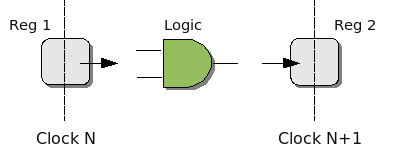
In hardware design, the logic blocks are made up of multiple stages, very much like CPU pipelining. Each clock cycle, data is read from an internal register, passes through some combinational logic, and is stored in a register to wait for the next clock cycle. The register can be the same one (i.e. for repeated processing as in multiple rounds of a block cipher) or a different one.

chippipe1.png

The maximum clock rate for the chip is constrained by the slowest block. If it takes one block 10 ns to propagate a signal from register to register, your maximum clock rate is 100 MHz, even if most of the other blocks are faster. If this is the case, the designer can either slice that function up into smaller blocks (but increase the total latency) or try to redesign it to take less time.

A CPU is made up of multiple blocks. There is logic like the ALU or branch prediction, RAM for named registers and cache, and state machines for coordinating the whole show. If you examine an assembly instruction datasheet, you’ll find that each instruction takes one or more clocks and sometimes a variable number. For example, branch instructions often take more clock cycles if the branch is taken or if there is a branch predictor and it got it wrong. As signals propagate between each block, the CPU is in an intermediate state. At a higher level, it is also in an intermediate state during execution of multi-cycle instructions.

As you can see from all this, a CPU is very sensitive to all the signals that pass through it and their timing. These signals can be influenced by the voltage at external pins, especially the clock signal since it is distributed to every block on a chip. When signals that have out-of-spec timing or voltage are applied to the pins, computation can be corrupted in surprisingly useful ways.