Felten on fingerprinting blank paper

Ed Felten posted last week about his upcoming publication on fingerprinting techniques for blank paper. This is a great paper with practical applications. It reminded me to discuss some of the fundamental issues with fingerprinting and the potential problems when it comes to real-world forgery.

Long ago, some copy protections for floppy disks used a method known as “weak bits”. The mastering equipment would write a long string of zeros to the disk. This would cause the read head to return a varying string of bits with some pattern to it. The software would check that this region returned different values each time it was read to make sure it wasn’t a copy.

Similar techniques have also been applied to magstripe media for credit cards. Magtek makes a reader that attempts to measure physical characteristics of the magnetic stripe and submit this as a fingerprint for a given card. The general idea is that while the data on a card can be easily duplicated with a reader, the manufacturing process for the physical media leaves behind certain random “noise” that is difficult to reproduce.

This is similar to the Felten paper. They attempt to create a unique fingerprint for a piece of paper based on the variations in fibers that are visible with a high-resolution scan. They take multiple scans from different angles as well.

All of these techniques have something in common. The characteristic being measured must actually have some uniqueness. There must be a cost-effective way to measure that characteristic. There must be a sampling mechanism that chooses different areas to examine. The fingerprint algorithm must combine the samples in a way that is resilient to natural errors (i.e., no false positives). Yet it also must be difficult for a forger to create a copy that is close enough to the original to be accepted by the verifier (i.e., no false negatives).

Both magstripes and paper appear to have enough inherent uniqueness. The manufacturing techniques of both do create a lot of low-level variation. But once this requirement is satisfied, the fingerprint approach itself is still subject to fundamental limitations. No fingerprinting method can avoid them. It needs to be resilient not only in the face of regular use (e.g., crumpling the paper) but also with intentionally malicious manipulation. The conflicting requirements to avoid false positives and yet also be difficult to clone are always the most difficult part of any kind of fingerprinting scheme. This is a fundamental problem with any kind of statistical decision process.

There are two kinds of forgery attacks: second pre-image and collision. The former is the most obvious one, where an attacker creates a copy that matches some existing original. The latter is much harder to prevent. To create a collision, that attacker can pre-process two pieces of paper in order to create two documents that the fingerprint algorithm judges as close enough to be identical. For example, the attacker can write a sequence of small dots to both pages in a similar pattern before printing the text. He can repeat this multiple times while varying the pattern until the verifier judges the papers as close enough. Depending on the sampling algorithm and the attacker’s printing capabilities, this may be more difficult. Section 6 of the paper discusses this kind of attack but it mostly focuses on preventing a second pre-image attack and most of the analysis is left for the future.

The key thing to remember is that the attacker does not need to make the papers actually identical by reproducing the exact pattern of fibers on the paper. The attacker doesn’t even have to have a particularly fine dot resolution, as long as the position of the dots can be controlled. The idea is that the printed pattern overwhelms the fine characteristics measured by the scanner and thus two documents are judged to be close enough by the verifier. It also would be interesting to see how the fingerprint technique does against darker colored paper.

This attack illustrates the fundamental limitation of this kind of fingerprint method. The verifier has to allow for some variation to prevent false positives. But an attacker can repeatedly try to exploit that rejection region by creating various pairs of documents until they pass.

All of this is based on a preliminary read of the paper, so I’m interested in what the Felten team plans to do to address this kind of problem.
Note to WordPress on SSL

Dear WordPress/Automattic:

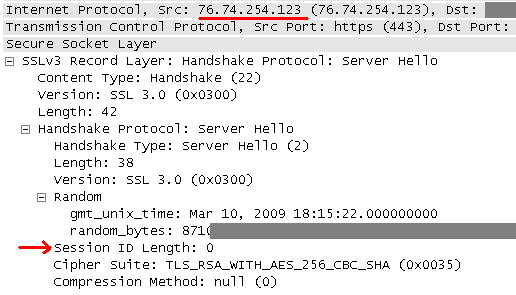
Your servers do not offer SSL session resumption. This means that every response contains a server certificate (3807 bytes) and your server has to perform a 2048-bit RSA decryption. This occurs for every piece of data fetched over SSL, even the tiny button pictures that are smaller than the certificate itself.

WP SSL Server Hello message

You should really enable SSL session resumption. It will save a lot of money in server cost and bandwidth, and your users will be happier too.

Thanks,
Nate

[Edit: WordPress staff replied that this was a mistake in their configuration and now this is fixed.]

Next Baysec: March 26 at Gordon Biersch

The next Baysec meeting is March 26th at Gordon Biersch. Come out and meet fellow security people from all over the Bay Area. As always, this is not a sponsored meeting, there is no agenda or speakers, and no RSVP is needed. Thanks go to Ryan Russell for planning all this.

See you Thursday, March 26th, 7-11 pm.

Gordon Biersch
2 Harrison St
San Francisco, CA 94105
(415) 243-8246

SSL is not table salt

While I haven’t written an article in a while, I’m still alive. I just got buried with work, tax prep, and using every spare moment to try to finish up the xum1541. Last week, I attended the iSec Forum and saw a talk about cookie forcing based on work by Chris Evans and Michael Zalewski. This attack involves overwriting SSL-only cookies with a cookie injected into a non-SSL connection. In other words, browsers prevent disclosure of SSL-only cookies, but not deletion or replacement by cookies from an insecure session.

I don’t follow network security closely so this may be an older attack. However, it reminds me how the web application and browser designers treat SSL like table salt — sprinkle a little bit here and there, but be careful not to overuse it. That’s completely the wrong mentality.

WordPress recently notified their users how to enable SSL for the admin interface. While it’s admirable that they are providing more security, the attitude behind the post is a great example of this dangerous mentality. They claim SSL is only recommended when blogging from a public network, even going so far as to suggest it be disabled again when back on a “secure network”. It’s hard to believe performance is the issue, given the CPU gains in the past 13 years.

Attention: if you’re using a web application on a shared network (say, the Internet), you’re not on a secure network. This whole idea that users should pick and choose SSL based on some ephemeral security assessment of the local network is insane. How can you expect anyone, let alone regular users, to perform a security assessment before disabling SSL and then remember to re-enable it before traveling to an insecure network? (You can’t log into your blog and re-enable SSL from the insecure network because you would get compromised doing so.)

Likewise, sites such as Yahoo Mail use SSL for submitting the login password, but then provide a session cookie over plain HTTP. A session cookie is almost as good as a password. As long as the attacker refreshes their own session periodically, the cookie stays valid. (Do any web services implement an absolute session limit?) Even if the user clicks “log out”, the attacker can feed a fake logout page to them and keep the cookie active.

All cookies should definitely have their own cryptographic integrity protection and encryption, independent of SSL. But it is clear that the entire attitude toward SSL is wrong, and we will all eventually have to change it. Open wireless networks have helped session hijacking proliferate, no ARP spoofing needed. Soon, malware may contain a MITM kit to compromise any user accessing a website who shares an access point with a rooted system. As this attack becomes more common, perhaps we’ll see the end of SSL as an accessory, and it will be mandated for the entirety of every authenticated session. The prevailing attitude will have to change first.

Fixing DSL lost sync problem

I have had an annoying problem for almost a year. Whenever someone picks up our phone, the DSL modem would lose sync for a minute. Usually that was enough for some connections to time out. Since we don’t use the home phone much, I put up with this longer than I should have.

I called AT&T to have them check out the line. It passed their automated line test. Before this, I had carefully narrowed down the problem. I unplugged all phones from their jacks and made sure each had a proper DSL filter on them. I checked the alarm system. I tried with a different phone to be sure it wasn’t that. I moved the DSL modem to another jack. No difference. Picking up the phone or going back on hook would cause the modem to lose sync. At all other times, it was fine.

The tech came out and did some line quality tests. We disconnected the internal wiring and plugged the DSL modem directly into the external wiring. The problem still happened. He called for some assistance but his support was baffled too. He finally apologized and said maybe the modem was bad.

Last night, I tried with a different modem and had the same issue. I did some more looking and found a bit of information on this. Back in the old days, Pac Bell would install an MTU (maintenance test unit) or “half ringer”. This device allowed them to do a line test without the customer being involved. However, the voltage change of going on-hook causes it to “bounce” the line. Before DSL, this didn’t matter because no one was on the line to hear the bounce. DSL is like an always-on modem connection so any noise or interruption will cause it to restart the sync cycle and you lose your Internet for a minute.

I dug into my telco box (NID) this morning and found this was the problem. To prevent others from wasting hours arguing with phone support that there really is a line problem, here’s how to diagnose this yourself. I’ll use my box as an example, but keep in mind these devices come in various shapes.

Telco box (NID) from the outside

First, find your telco box. This is where wires enter from the street and connections are made to your inside wiring. There’s a screw on the right that allows you to open the cover.

Inside the telco box

Once you open the cover, you’ll see two sections. The inside wiring is on the right and is accessible by opening each terminal cover. The telco side uses a special screw so it’s harder for you to open. In most cases, you won’t need to open that side anyway. As you can see, only the top two terminals of my box are in use for inside wiring. The others are still available. If removing an MTU, you only need to do it from lines that are actually used. I found that every single one of these terminals had an MTU behind it!

Inside AT&T's side of the point of demarcation

Just to be thorough, I checked inside AT&T’s side of the terminals. Indeed there is no MTU here, just some wiring posts.

Finding the MTU
Finding an MTU

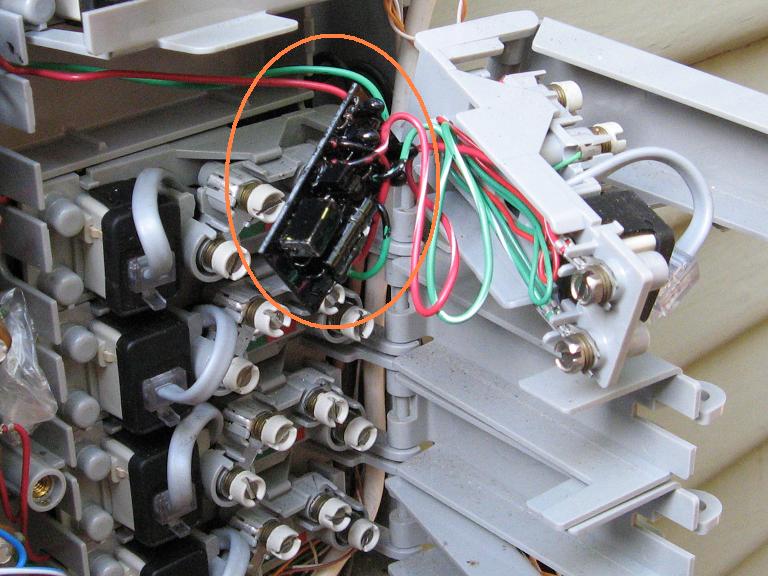
The MTU is the little black circuit board here, behind the terminals. It is wired in series with the inside wiring so I can’t just cut it out. Some people cut it out and then use gel-filled wire nuts to splice the wires. I chose an easier and less clean route of stripping the wires and attaching them directly to the screws on the right side.

The finished wiring job

I repeated this for both terminals that were in use. I didn’t bother with the others for now. Finally, I put everything back together and tested for dial tone. DSL was working and the problem was gone!

Here are some other links to info about this problem and pictures of other MTU devices.

All in all, this wasted about 6 hours of my time troubleshooting, calling AT&T, explaining it to the tech, etc. Too bad I can’t bill them for my time. I hope this article will save your time and that the telcos will educate their support staff more on this very common problem.